AI ಡಬಲ್ ಎಕ್ಸ್ಪೋಶರ್ ಫೋಟೋ ಟ್ರೆಂಡ್: ನಿಮ್ಮ ಚಿತ್ರವನ್ನು ಸಿನಿಮಾ ಪೋಸ್ಟರ್ನಂತೆ ರೂಪಿಸುವ ಸರಳ ವಿಧಾನ
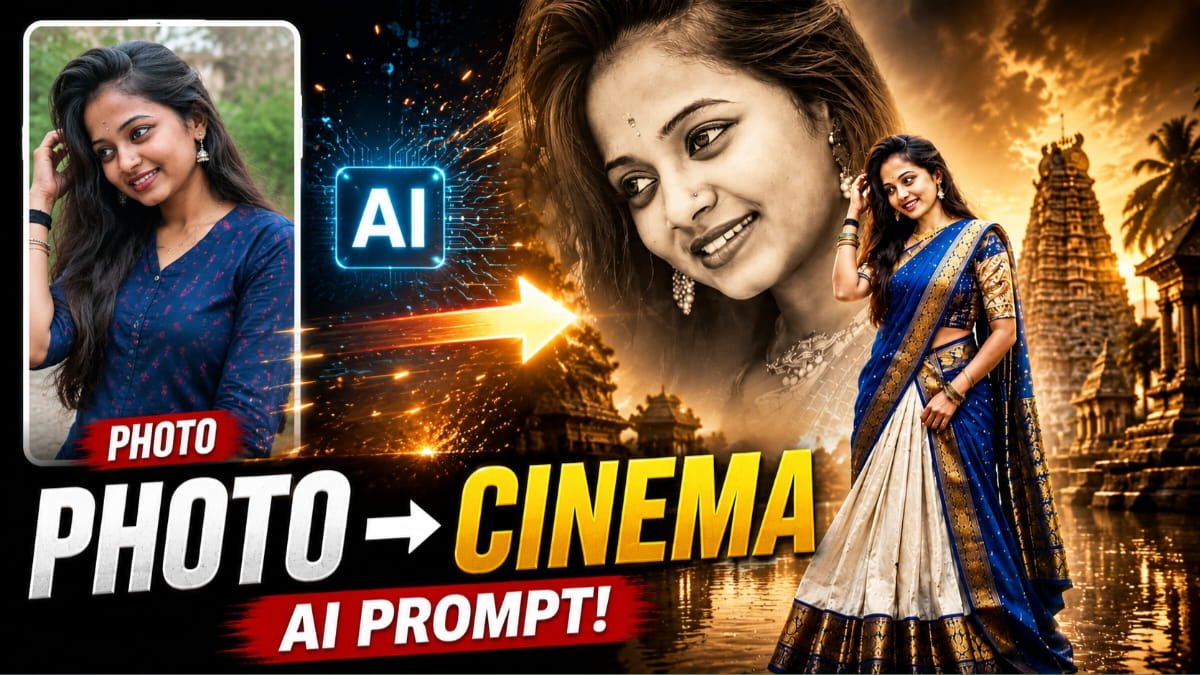
ಸಾಮಾಜಿಕ ಜಾಲತಾಣಗಳಲ್ಲಿ ಇತ್ತೀಚೆಗೆ ಗಮನ ಸೆಳೆಯುತ್ತಿರುವ AI ಫೋಟೋ ಟ್ರೆಂಡ್ಗಳಲ್ಲಿ ಡಬಲ್ ಎಕ್ಸ್ಪೋಶರ್ ಸಿನಿಮಾ ಪೋಸ್ಟರ್ ಶೈಲಿ ಪ್ರಮುಖವಾಗಿದೆ. ಒಂದೇ ವ್ಯಕ್ತಿಯ ಮುಖದ ದೊಡ್ಡ monochrome close-up ಚಿತ್ರವನ್ನು ಹಿನ್ನೆಲೆಯಾಗಿ ಇಟ್ಟು, ಅದೇ ವ್ಯಕ್ತಿಯ full-body ಬಣ್ಣದ ಚಿತ್ರವನ್ನು ಮುಂಭಾಗದಲ್ಲಿ ನಿಲ್ಲಿಸುವ ಈ ವಿನ್ಯಾಸವು ಸಾಮಾನ್ಯ ಫೋಟೋವನ್ನು ಕಥೆ ಹೇಳುವ ದೃಶ್ಯವಾಗಿ ಪರಿವರ್ತಿಸುತ್ತದೆ. ನೀವು ನೀಡಿರುವ ಮಾದರಿ ಚಿತ್ರಗಳಲ್ಲಿ ಇದೇ ತಂತ್ರವನ್ನು ಬಳಸಲಾಗಿದೆ: ದೊಡ್ಡ ಕಪ್ಪು-ಬಿಳುಪು ಮುಖ, ಮುಂದೆ ಸಾಂಪ್ರದಾಯಿಕ ಉಡುಪಿನಲ್ಲಿರುವ ವ್ಯಕ್ತಿ, ಹಿನ್ನಲೆಯಲ್ಲಿ ದೇವಾಲಯದ ವಾತಾವರಣ, ನೀರಿನ ಪ್ರತಿಬಿಂಬ, ಸೂರ್ಯಾಸ್ತದ ಬೆಳಕು ಮತ್ತು cinematic color grading.
ಉತ್ತಮ AI ಫೋಟೋಗೆ ಮೊದಲ ಹೆಜ್ಜೆ: ಸರಿಯಾದ Reference Image
ಈ ರೀತಿಯ ಚಿತ್ರವನ್ನು ಸೃಷ್ಟಿಸಲು ಮೊದಲ ಅಗತ್ಯವೇ ಉತ್ತಮ reference photo. ಮುಖ ಸ್ಪಷ್ಟವಾಗಿ ಕಾಣುವ, ಬೆಳಕು ಸಮತೋಲನದಲ್ಲಿರುವ ಮತ್ತು ಸಾಧ್ಯವಾದಷ್ಟು ಕಡಿಮೆ blur ಇರುವ ಚಿತ್ರವನ್ನು ಆಯ್ಕೆ ಮಾಡುವುದು ಉತ್ತಮ. ಒಂದೇ ವ್ಯಕ್ತಿಯ ವಿಭಿನ್ನ ಚಿತ್ರಗಳನ್ನು ಬಳಸಿದರೆ ಮುಖದ ಗುರುತು, ಕೂದಲು, ಕಣ್ಣು, ಮೂಗಿನ ಆಕಾರ ಮತ್ತು ನಗುವಿನ ಭಾವ ಒಂದೇ ರೀತಿಯಲ್ಲಿ ಉಳಿಯುವಂತೆ prompt ನಲ್ಲಿ ಸ್ಪಷ್ಟ ಸೂಚನೆ ನೀಡಬೇಕು.
AI ಚಿತ್ರ ರಚನಾ ಸಾಧನಗಳಲ್ಲಿ uploaded image ಅನ್ನು reference ಆಗಿ ನೀಡಿ, ಅದರ ಆಧಾರದ ಮೇಲೆ ಹೊಸ ದೃಶ್ಯವನ್ನು ಸೃಷ್ಟಿಸಲು ಕೇಳಬಹುದು. ಪ್ರಸ್ತುತ image-generation workflows ನಲ್ಲಿ uploaded image edit ಮಾಡುವುದು, ಹಲವು ಚಿತ್ರಗಳನ್ನು ಸೇರಿಸಿ ಹೊಸ composition ರಚಿಸುವುದು ಮತ್ತು ನಂತರ edits ಮೂಲಕ ಫಲಿತಾಂಶವನ್ನು ಪರಿಷ್ಕರಿಸುವುದು ಸಾಧ್ಯವಾಗಿದೆ. ಪರಿಣಾಮಕಾರಿ prompt ಬರೆಯುವಾಗ subject, composition, action, location, style ಮತ್ತು editing instructions ಅನ್ನು ಸ್ಪಷ್ಟವಾಗಿ ಹೇಳುವುದು ಉತ್ತಮ ಫಲಿತಾಂಶಕ್ಕೆ ಸಹಾಯ ಮಾಡುತ್ತದೆ.
Double Exposure Effect ಹೇಗೆ ಬರುತ್ತದೆ?
ಈ ಟ್ರೆಂಡ್ನ ಮುಖ್ಯ ಆಕರ್ಷಣೆ double exposure composition. ಹಿನ್ನೆಲೆಯ ದೊಡ್ಡ portrait ಅನ್ನು monochrome ಅಥವಾ low-saturation ಆಗಿ ಇಟ್ಟು, ಅದಕ್ಕೆ soft blur ಮತ್ತು cinematic lighting ನೀಡಬೇಕು. ಮುಂಭಾಗದ full-body subject ಮಾತ್ರ ಹೆಚ್ಚು ಬಣ್ಣದ, sharp ಮತ್ತು detailed ಆಗಿರಬೇಕು. ಈ contrast ಚಿತ್ರಕ್ಕೆ poster-like depth ನೀಡುತ್ತದೆ.
ಉದಾಹರಣೆಗೆ royal blue ಮತ್ತು ivory saree, gold temple-border embroidery, traditional jewellery, bangles ಮತ್ತು subtle makeup ಸೇರಿಸಿದರೆ ಭಾರತೀಯ ಸಾಂಸ್ಕೃತಿಕ ಭಾವನೆ ಹೆಚ್ಚುತ್ತದೆ. ದೊಡ್ಡ background portrait ಭಾವನಾತ್ಮಕ ವಾತಾವರಣ ಸೃಷ್ಟಿಸಿದರೆ, foreground character ಚಿತ್ರದ ಮುಖ್ಯ ಕಥಾನಾಯಕಿಯಂತೆ ಕಾಣುವಂತೆ composition ರೂಪಿಸಬಹುದು.
ಹಿನ್ನೆಲೆ ಮತ್ತು Lighting ಕೂಡ ಅಷ್ಟೇ ಮುಖ್ಯ
ಹಿನ್ನೆಲೆಯಲ್ಲಿರುವ ದೇವಾಲಯದ ಗೋಪುರ, ಹಳೆಯ ಕಲ್ಲಿನ ವಾಸ್ತುಶಿಲ್ಪ, ಕೆರೆ ಅಥವಾ ನದಿ, ನೀರಿನ reflection, ದೂರದ ಮರಗಳು ಮತ್ತು warm sunset sky ಇವುಗಳನ್ನು ಒಂದೇ visual language ನಲ್ಲಿ ಜೋಡಿಸಬೇಕು. Subject ಮೇಲೆ golden rim light ಬಿದ್ದಂತೆ ಮತ್ತು ಹಿನ್ನಲೆಯಲ್ಲಿ light rays ಹರಡಿದಂತೆ ಸೂಚಿಸಿದರೆ cinematic mood ಹೆಚ್ಚು ಸ್ಪಷ್ಟವಾಗುತ್ತದೆ.
Depth of field, atmospheric haze ಮತ್ತು realistic fabric texture ಸೇರಿಸಿದರೆ ಚಿತ್ರವು editorial photograph ನಂತೆ ಕಾಣುವ ಸಾಧ್ಯತೆ ಹೆಚ್ಚುತ್ತದೆ. ವಿಶೇಷವಾಗಿ foreground ಮತ್ತು background ನಡುವಿನ scale difference ಅನ್ನು prompt ನಲ್ಲಿ ನೇರವಾಗಿ ಹೇಳುವುದು ಮುಖ್ಯ. ದೊಡ್ಡ portrait ಮೇಲ್ಭಾಗ ಮತ್ತು ಮಧ್ಯಭಾಗವನ್ನು ಆವರಿಸಬೇಕು; ಸಣ್ಣ full-body subject ಕೆಳಭಾಗದಲ್ಲಿ ಪ್ರಮುಖವಾಗಿ ಕಾಣಬೇಕು.
100% Face Preservation ಸಾಧ್ಯವೇ?
“100% face preservation” ಎಂಬ ಪದಗಳನ್ನು prompt ನಲ್ಲಿ ಬಳಸಿದರೂ ಪ್ರತಿಯೊಂದು generation ನಲ್ಲೂ ಮುಖ ಶೇಕಡಾ ನೂರರಷ್ಟು ಒಂದೇ ಆಗುತ್ತದೆ ಎಂಬ ಖಾತರಿ ಇರುವುದಿಲ್ಲ. ಆದ್ದರಿಂದ ಮೊದಲ output ಬಂದ ನಂತರ ಕಣ್ಣು, ಮೂಗು, ತುಟಿ, ಕೂದಲು, ಕೈಗಳು, ಆಭರಣ ಮತ್ತು ಬಟ್ಟೆಯ border ಅನ್ನು ಪರಿಶೀಲಿಸಬೇಕು.
ತಪ್ಪು ಕಂಡರೆ ಸಂಪೂರ್ಣ ಚಿತ್ರವನ್ನು ಮತ್ತೆ generate ಮಾಡುವ ಬದಲು “ಮುಖವನ್ನು reference image ಗೆ ಇನ್ನಷ್ಟು ಹೊಂದಿಸಿ”, “ಕೈಗಳ anatomy ಸರಿಪಡಿಸಿ”, “saree border ಅನ್ನು consistent ಆಗಿರಿಸಿ” ಎಂಬ targeted edit ಸೂಚನೆಗಳನ್ನು ನೀಡುವುದು ಹೆಚ್ಚು ಪರಿಣಾಮಕಾರಿ. ಹಂತ ಹಂತವಾಗಿ edit ಮಾಡುವ ವಿಧಾನದಿಂದ ಅಂತಿಮ ಫಲಿತಾಂಶವನ್ನು ಹೆಚ್ಚು ನಿಯಂತ್ರಿಸಬಹುದು.
Instagramಗಾಗಿ 9:16 Vertical Format
Aspect ratio ಕೂಡ ಮುಖ್ಯ. Instagram Reels, Stories ಮತ್ತು mobile-first posts ಗಾಗಿ 9:16 vertical composition ಸೂಕ್ತವಾಗಿದೆ. Subject ಅನ್ನು ಕೆಳಭಾಗದಲ್ಲಿ full bodyಯೊಂದಿಗೆ ಇರಿಸಿ, ದೊಡ್ಡ background portrait ಅನ್ನು ಮೇಲ್ಭಾಗದಲ್ಲಿ balance ಮಾಡಿದರೆ screen ಮೇಲೆ visual hierarchy ಚೆನ್ನಾಗಿ ಕಾಣುತ್ತದೆ.
ಅಗತ್ಯವಿದ್ದರೆ signature ಅಥವಾ title text ಅನ್ನು ನಂತರ editing app ನಲ್ಲಿ ಸೇರಿಸುವುದು ಉತ್ತಮ. AIಗೆ ನೇರವಾಗಿ ಹೆಚ್ಚು ಪಠ್ಯ ನೀಡಿದರೆ spelling ಅಥವಾ lettering ತಪ್ಪುಗಳು ಕಾಣಿಸಬಹುದು. ಆದ್ದರಿಂದ ಮೊದಲು visual ಅನ್ನು ಉತ್ತಮವಾಗಿ generate ಮಾಡಿ, ನಂತರ typography ಸೇರಿಸುವುದು ಸುರಕ್ಷಿತ ವಿಧಾನ.
PM Kisan e-KYC: ಇ-ಕೆವೈಸಿ ಮಾಡದ ರೈತರಿಗೆ ₹2,000 ಕಂತು ರದ್ದು! ತಕ್ಷಣ ಮೊಬೈಲ್ ಮೂಲಕ e-KYC ಮಾಡಿ
AI ಚಿತ್ರ ಬಳಸುವಾಗ ಗಮನಿಸಬೇಕಾದ ವಿಷಯಗಳು
AI ಚಿತ್ರಗಳನ್ನು ಪ್ರಕಟಿಸುವಾಗ ಮೂಲ reference photo ನಿಮ್ಮದೇ ಆಗಿರಬೇಕು ಅಥವಾ ಬಳಸಲು ಅನುಮತಿ ಇರಬೇಕು. ಮತ್ತೊಬ್ಬರ ಮುಖವನ್ನು ಅನುಮತಿಯಿಲ್ಲದೆ ಬಳಸುವುದು, ಚಿತ್ರವನ್ನು ನೈಜ ಫೋಟೋ ಎಂದು ತಪ್ಪಾಗಿ ಪ್ರದರ್ಶಿಸುವುದು ಅಥವಾ ಗುರುತಿನ ಬಗ್ಗೆ ಗೊಂದಲ ಸೃಷ್ಟಿಸುವುದು ತಪ್ಪಿಸಬೇಕು. AI-generated ಅಥವಾ AI-edited visual ಎಂದು ಅಗತ್ಯವಿದ್ದರೆ ಸ್ಪಷ್ಟಪಡಿಸುವುದು ವಿಶ್ವಾಸಾರ್ಹತೆಯನ್ನು ಹೆಚ್ಚಿಸುತ್ತದೆ.
ಮೊಬೈಲ್ನಲ್ಲೇ ಈ workflow ಅನುಸರಿಸುವವರಿಗೆ ಸರಳ ಕ್ರಮ ಸಹಾಯಕವಾಗುತ್ತದೆ. ಮೊದಲಿಗೆ ಮೂಲ ಫೋಟೋವನ್ನು upload ಮಾಡಿ, ಮುಖದ ಗುರುತು, hairstyle ಮತ್ತು natural expression ಅನ್ನು reference ಆಗಿ ಉಳಿಸುವಂತೆ ಸೂಚಿಸಿ. ನಂತರ scene ಅನ್ನು ವಿವರಿಸಿ. ಮೊದಲ ಫಲಿತಾಂಶದಲ್ಲಿ pose ಅಥವಾ dress ಸರಿಯಾಗಿದ್ದರೂ background ದುರ್ಬಲವಾಗಿದ್ದರೆ background ಮಾತ್ರ ಬದಲಾಯಿಸಲು ಕೇಳಬಹುದು.
Prompt ನಲ್ಲಿ ಅತಿಯಾದ camera settings ತುಂಬಿಸುವುದಕ್ಕಿಂತ ದೃಶ್ಯದಲ್ಲಿ ಬೇಕಾದ ಅಂಶಗಳನ್ನು ಕ್ರಮಬದ್ಧವಾಗಿ ಬರೆಯುವುದು ಉಪಯುಕ್ತ. ಮೊದಲು subject, ನಂತರ pose, costume, background, lighting, colour treatment ಮತ್ತು ಕೊನೆಯಲ್ಲಿ image quality ಹಾಗೂ aspect ratio ಬರೆಯಬಹುದು. “Do not change the identity”, “keep natural facial proportions”, “no extra fingers”, “no duplicate body”, “no distorted jewellery” ಮುಂತಾದ quality-control ಸೂಚನೆಗಳು ದೋಷಗಳನ್ನು ಕಡಿಮೆ ಮಾಡಲು ಸಹಾಯ ಮಾಡುತ್ತವೆ.
ನೀವು ನೀಡಿರುವ ಮಾದರಿಗಳಲ್ಲಿ ವಿಶೇಷವಾಗಿ foreground ಮತ್ತು background ನಡುವಿನ scale difference ಗಮನಾರ್ಹವಾಗಿದೆ. ದೊಡ್ಡ portrait ಭಾವನಾತ್ಮಕ ಹಿನ್ನೆಲೆಯಾಗಿ ಕೆಲಸ ಮಾಡುತ್ತದೆ; ಸಣ್ಣ full-body subject ಕಥೆಯ ಮುಖ್ಯ ಪಾತ್ರದಂತೆ ಕಾಣುತ್ತದೆ. ಈ relationship ಅನ್ನು prompt ನಲ್ಲಿ ನೇರವಾಗಿ ವಿವರಿಸಿದರೆ composition ಹೆಚ್ಚು ನಿಯಂತ್ರಿತವಾಗಬಹುದು.
ಅಂತಿಮವಾಗಿ, image generation ಅನ್ನು ಒಂದೇ ಪ್ರಯತ್ನದಲ್ಲಿ perfect ಮಾಡುವ ಬದಲು creative editing process ಎಂದು ನೋಡಬೇಕು. ಮೊದಲ generation ಒಂದು draft. ಎರಡನೇ ಹಂತದಲ್ಲಿ face, dress, pose ಅಥವಾ background ತಿದ್ದಬಹುದು. ಮೂರನೇ ಹಂತದಲ್ಲಿ lighting, colour grading ಮತ್ತು typography polish ಮಾಡಬಹುದು. ಇದೇ ವಿಧಾನದಿಂದ reference photo ಬಳಸಿ blue-white saree, red-gold saree, festival look, temple look ಅಥವಾ royal editorial look ಮುಂತಾದ ಹಲವು ವಿಭಿನ್ನ versions ಸೃಷ್ಟಿಸಬಹುದು.
ಒಟ್ಟಿನಲ್ಲಿ, ಈ double-exposure trend ಕೇವಲ filter ಅಲ್ಲ; reference photo, character consistency, composition, lighting, costume, background ಮತ್ತು post-editing—ಈ ಎಲ್ಲ ಅಂಶಗಳ ಸಂಯೋಜನೆಯ ಫಲಿತಾಂಶ. ಸರಿಯಾದ reference image ಮತ್ತು ವಿವರವಾದ prompt ಬಳಸಿದರೆ ಸಾಮಾನ್ಯ portrait ಅನ್ನು ಭಾರತೀಯ ಸಿನೆಮಾ ಪೋಸ್ಟರ್ನಂತಹ ಭಾವನಾತ್ಮಕ, premium ಮತ್ತು share-worthy visual ಆಗಿ ರೂಪಿಸಬಹುದು.
AI Prompt Copy Box – Custom HTML Code ಕೆಳಗಿನ code ಅನ್ನು ನಿಮ್ಮ blog postನ Custom HTML / HTML Editor ವಿಭಾಗದಲ್ಲಿ paste ಮಾಡಿ.
1 thought on “AI Double Exposure Photo Trend: ನಿಮ್ಮ ಫೋಟೋಗೆ ಸಿನಿಮಾ ಲುಕ್ ನೀಡುವ ಸುಲಭ ವಿಧಾನ | Prompt 1”